
Zelle is a peer-to-peer payment network that allows users to send money directly between bank accounts using an email address or phone number. Unlike standalone payment apps, Zelle is embedded within participating bank apps, where transactions are initiated and recorded.
Due to the service’s popularity, Zelle scams are becoming one of the most common financial crimes in 2026. Whether you’re on a call with a Miami Dade County schemer or just trying to take a nice cruise, no one is safe from criminals.
Zelle fraud relies on three forms of documentation: payments, receipts, and screenshots.
In a typical Zelle scam, fraudsters edit screenshots of bank interfaces, send fake email confirmations, or misrepresent payment states, using fear and urgency to make the money move before anyone knows better.
Outside the banking app in situations where proof of payment is required, Zelle screenshots and payments can be used to verify rental deposits, online purchases, reimbursements, or dispute resolution.
Document fraud templates, AI-generated documents, and entirely fake onboarded accounts make up the fraud infrastructure surrounding Zelle scams, making them more scalable and more convincing.
Lets get started.
What is a Zelle scam?
A Zelle scam, Zelle fraud, or Zelle payment scam uses the Zelle payment network or fabricated Zelle transaction evidence to deceive victims into sending money or accepting false proof of payment or to justify transactions that never took place or were misrepresented.
In practice, Zelle fraud tends to occur in two ways:
- Fraud within the platform. This refers to scams where victims are manipulated into sending real Zelle payments themselves. Examples include:
- Posing as a bank’s fraud department via phone, SMS, or email, instructing victims to send a Zelle payment to a “secure account” to stop suspicious activity.
- Convincing victims to “pay themselves” to reverse fraud, but providing attacker-controlled recipient details disguised as their own.
- Sending fake Zelle payment confirmations (screenshots or emails) to pressure victims into releasing goods, services, or refunds before verifying the transaction.
- Claiming an accidental overpayment and requesting a partial refund, using manipulated or nonexistent Zelle transactions as proof.
- Impersonating friends, coworkers, or family members to request urgent Zelle transfers, often citing emergencies or time-sensitive situations.
- Fraud outside the platform. This involves the use of Zelle-related artifacts as evidence in situations where proof of payment is required. Examples include:
- Evidence of rent, deposits, or holding fees in rental applications, lease agreements, or housing disputes.
- Uploading edited Zelle transaction screens to justify contractor payouts, shared costs, or business expense claims.
- Presenting fake Zelle payment evidence during freelance or gig work disputes to assert that compensation was already delivered.
- Zelle transaction history screenshots as part of onboarding or verification flows (e.g. to demonstrate income, payments, or transaction activity).
Regardless of if the Zelle scam is inside or outside the platform, it usually involves a payment, receipt, or screenshot.
Zelle does not issue standardized, standalone documents for transactions. Instead, it provides confirmations within bank apps, along with email or SMS notifications depending on the institution. These are system-generated notifications tied to the banking interface, not independent documents designed for third-party verification.
These representations can be treated as if they prove that a transaction occurred. However, they lose important context and authenticity guarantees once shared outside the original banking environment.
The most commonly used Zelle payment screens and transaction evidence include:
- In-app transaction confirmations. Screens showing a completed or pending payment inside a bank interface with Zelle labeling.
- Email payment notifications. If you’re already enrolled with Zelle these emails are typically in your bank's formatting. If you haven’t enrolled yet, you may get an email in Zelle’s branding asking if you want to enroll.
- Text message alerts. SMS notifications from your bank tied to payment activity, referencing the Zelle payment network.
- Activity feed screenshots. Captures of transaction history screens (from your bank) showing recent payments. Zelle payments are typically labeled with “zelle, zelle payment, or zelle transfer.”
- Payment detail screens. Individual transaction views with amount, recipient, status, and the Zelle branding.
Unlike other platforms like Cash App and Venmo, this is not standardized, it varies across banking platforms, both in overall layout and how the Zelle payment service is mentioned. They are easily transformed into static formats like screenshots that strip away system-level signals such as metadata, session context, and real-time status.
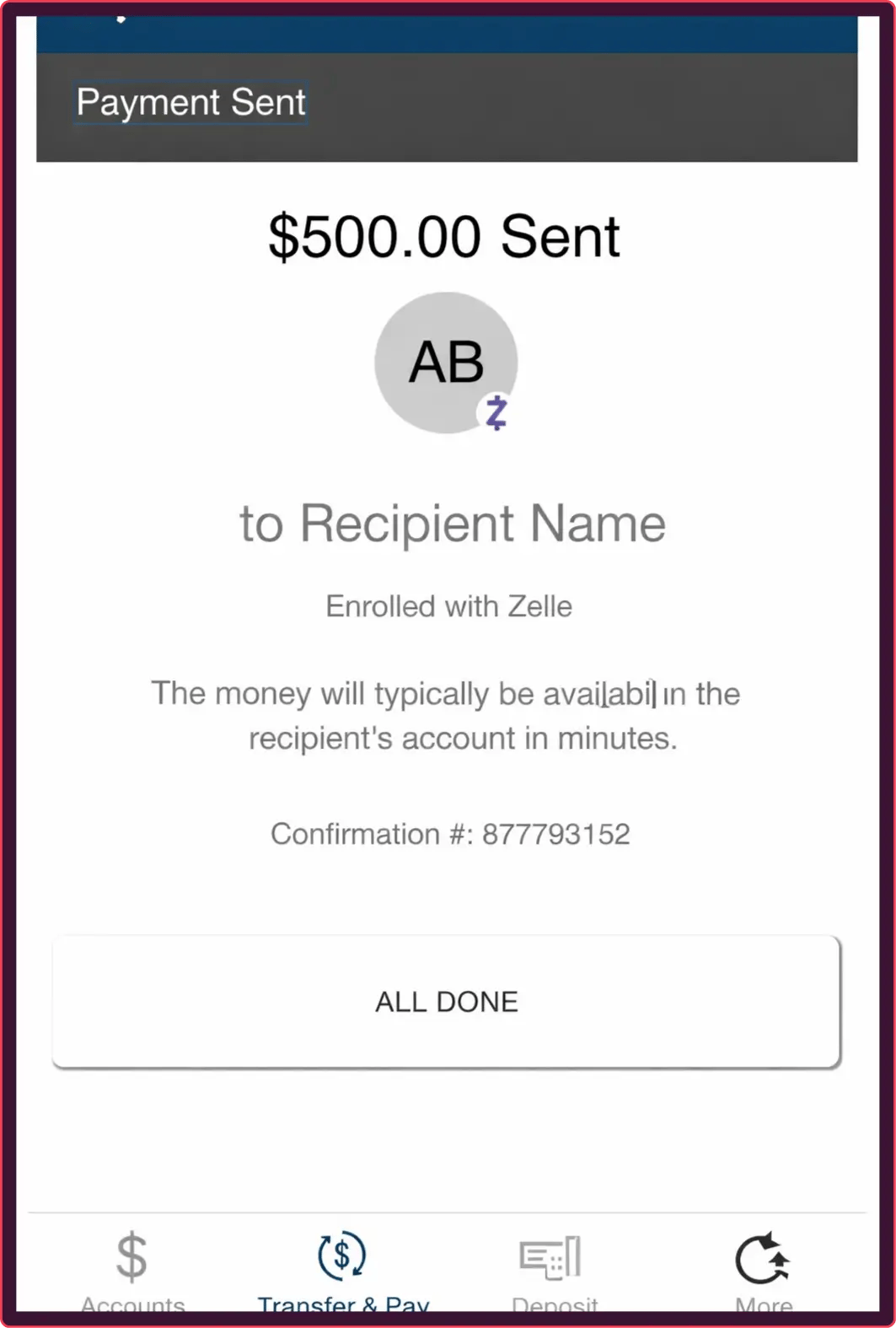
An example of a Venmo transaction for illustrative purposes only.
In real-world scenarios, this means a fraudster can present a convincing Zelle payment confirmation without perfectly mimicking your banking app's internal structure. As long as it appears legitimate at a glance, there’s really no formatting giveaways that could indicate fraud.
For example, an edited screenshot may show a completed payment in a user interface you’re unfamiliar with, when the real transaction was never sent.
For anyone reviewing Zelle transaction evidence, this creates a fundamental problem: visual accuracy and formatting consistency does not equal transactional truth. Without access and knowledge to the underlying banking system, it is difficult to confirm whether the payment actually occurred.
How to stop Zelle fraud
AI document verification is the most effective way to stop Zelle fraud.
Modern editing tools and generative AI make fake Zelle payments, receipts, and screenshots easy to reproduce, modify, and reuse at scale. Without consistent formatting, third party verification, or obvious visual traces to rely on, manual reviews come up short.
AI document fraud detection works by analyzing how transaction evidence is constructed rather than simply reading what it says. Instead of trusting surface-level content, it evaluates structural, visual, and contextual signals that indicate whether an artifact is genuine or manipulated.
These systems detect fraud using signals such as:
- Structural/formatting anomalies.
- Cross-document signals.
- Submission behavior.
- Backgrounds.
- Image consistency.
- More!
This approach effectively weeds out fraudulent Zelle artifacts that may look correct visually, but their underlying structure (fonts, element spacing, logos) often reveals manipulation.
Zelle payments, receipts, and screenshots are convenient because they’re easy to produce, making submission volumes for review teams relatively massive. Manual review cannot reliably identify subtle edits, reused artifacts, or AI-generated evidence across hundreds of thousands of submissions without a large possibility for human error.
How institutions can stop Zelle scams
AI-powered transaction monitoring complements document verification by analyzing the behavior behind Zelle payments, not just the artifacts themselves.
Transaction monitoring is useful because Zelle fraud often involves patterns that extend beyond a single piece of evidence. These include unusual payment timing, repeated interactions with new recipients, or behavioral signals associated with social engineering scams. Identifying those signals is the best way to stop Zelle payment fraud in real time.
AI transaction monitoring helps detect fraud by:
- Identifying abnormal payment patterns or velocity.
- Flagging interactions with known or high-risk recipient accounts.
- Detecting sequences consistent with impersonation or refund scams.
- Correlating activity across accounts, devices, and sessions.
Document fraud detection focuses on the evidence being presented, while transaction monitoring focuses on the behavior behind the transaction. Institutions need both to effectively detect and prevent Zelle scams at scale. Both capabilities are essential for AI fraud detection in 2026.
Threat intel: Template data about fake Zelle screenshots
Our Threat Intelligence Unit collects data about template farms which make and distribute fake document templates for fraudulent purposes.
During our research we haven't yet cataloged many Zelle documents, however, they are still very prevalent online. A simple search on Pinterest.com (a well known template hub) for "Zelle screenshot," reveals thousands of results.
They're even conveniently catalogued into "failed, fake, lock, payment successful, and account balance," so fraudsters can get the exact sequence they need.

Threat level: Legitimate Zelle screenshots should never have any indication (whether in metadata or website watermarks) of being downloaded from an online source. This is a clear sign of a threat.
Payment applications like Zelle are also heavily exposed to account farming (the resale of pre-onboarded accounts).
While we haven't found many examples of Zelle screenshots in the usual places, it could be because people are buying entire accounts and making the screenshots themselves (or buying two accounts, sending money to themselves, then using those screenshots).
How to spot Zelle payment scams
As we’ve already established, AI-powered verification is the most reliable way to detect Zelle fraud. That said, in many real-world scenarios (marketplace transactions, rental agreements, reimbursements, or dispute reviews), you may still need to conduct manual reviews.
Zelle documents are easy to fake to accept something just because it “seems legit.” You need to understand the nature of these electronic Zelle transactions and which structural signals consistently indicate fraud.
If any of the following red flags pop up in your Zelle receipts, screenshots, or payments, the transaction should be treated as high risk.
Fake Zelle receipts
Zelle does not generate formal, standalone receipts in the traditional sense. Instead, transaction confirmations are created within bank apps and sometimes delivered via email, SMS, or in-app notifications (from the bank not Zelle), depending on the institution.
This is an important distinction because that means any Zelle confirmations that claims to have originated from Zelle itself (outside the partner banking interface) should be treated as suspicious and likely fraudulent. This is because phased out its independent app in April 2025, becoming peer to peer infrastructure instead of a standalone app.
So, technically, there’s no such thing as a “Zelle receipts,” only screenshots and transaction records inside entirely separate apps and use cases. They reflect what the system displays at a moment in time but do not carry built-in guarantees once shared externally.
Fraud enters the picture when these confirmations are manipulated or fabricated. Common tactics include:
- Editing to change the amount, recipient, or status.
- Impersonating sender domains to mimic bank or Zelle notification emails.
- Recreating confirmation formats using templates or copied designs.
- Presenting “payment sent” notifications as proof of completed settlement.
Since there is no formal process for issuing transaction history documents or exporting transaction details, these payments are almost always verified as screenshots.
Fake Zelle screenshots
Screenshots (outside of forwarded email confirmations) are the only way to share evidence of Zelle transactions.
A screenshot is a static image captured by a user from their banking app or web interface. It may show a payment confirmation screen, activity feed, or transaction detail view.
Fraudsters exploit screenshots by:
- Editing amounts, recipient, dates, and payment status.
- Removing context.
- Reusing the same screenshot across multiple scams with minor changes.
- Recreating bank interfaces with Zelle branding to produce entirely fake screens.
Screenshots are limited as evidence because they are disconnected from the underlying transaction system. They do not provide access to live data, and they can be easily altered without leaving obvious visual traces.
In a document verification sense, screenshots are inherently risky because they remove valuable metadata that would otherwise indicate fraud. Most documents have pdf alternatives, so screenshotting them is inherently suspicious. This isn’t true for Zelle artifacts.
Since this is the most common way to share them, it can’t be treated as a warning sign like with other documents. Reviewers have to rely on other visual cues to assess their authenticity.
Fake Zelle payments
Zelle transactions can appear in different states depending on the situation. Unlike Cash App and Venmo which have brand specific terms for these states, the terms in Zelle transactions are reliant on the bank application you’re viewing them in. They don’t have standardized names, but can appear (like any transaction) as pending, completed, or failed.
Fraud frequently occurs when one of these states is presented inaccurately or fabricated entirely to create urgency or false assurance.
Common tactics include:
- Enrollment gap exploitation. Fraudsters initiate a payment to an email or phone number that is not enrolled in Zelle, which creates a “waiting” or “action required” state. They then present this as a completed payment and pressure the victim to act.
- Cross-channel confirmation spoofing. The fraudster combines multiple fake artifacts (such as a bank email and a matching screenshot) to simulate a consistent transaction trail.
- Recipient identity misdirection. Fraudsters send or fabricate a Zelle confirmation that appears to show the victim’s name, but the underlying identifier (email or phone number) does not actually belong to the victim.
- Interface mimicry across banks. Fraudsters recreate Zelle payment screens using generic, hybrid, or unknown bank interfaces, knowing there is no single standardized Zelle UI.
The screenshot or “receipt” serves as supporting evidence for the broader Zelle payment scams.
Understanding how Zelle payments appear and how their states can be manipulated is essential for distinguishing real transactions from fraudulent ones. Here are some visual signs to look out for:
7 Signs of Zelle fraud
Once you understand how fake Zelle payments, receipts, and screenshots work, the warning signs become apparent. Structural inconsistencies are usually the giveaway rather than obvious visual flaws.
Common indicators that help with Zelle fraud prevention are:
- Missing or inconsistent Zelle + bank co-branding. Legitimate Zelle transactions appear within a bank interface and typically include both bank identity and Zelle labeling. If you see a transaction post April 2025 with only Zelle branding then it is likely fraud. Same goes for bank transactions claiming to be done through Zelle without the Zelle logo (co-branded with your bank).
- Enrollment state inconsistency. A “completed” or “sent” payment shown without prior enrollment when the recipient is new, no indication of enrollment prompts or waiting states where they would normally appear, immediate confirmation of delivery to an identifier that has never been used with Zelle.
- Avoiding or delaying in-app confirmation. Saying “I can’t log in right now, or I no longer have access” is a pretty clear indication they shouldn’t be relied upon.
- Lack of surrounding account context. Crop tightly around the transaction, remove surrounding UI context, or omit account-level details that would validate the transaction.
- Suspicious email characteristics in “receipts.” Sender domains that don’t match official bank or Zelle domains, formatting inconsistencies or unusual phrasing, added urgency or instructions not typical of system notifications.
- Reused or slightly modified artifacts. Identical screenshots used across multiple interactions, minor edits to names, amounts, or dates, repeated formatting quirks (like the payment amount being a few pixels to the left) the same across different submissions.
- Standalone evidence submitted for verification. Zelle artifacts submitted as proof should always be seen as supporting evidence as opposed to standalone verification.
-
- Zelle confirmations are not designed for third-party verification.
- Artifacts lose authenticity once removed from the banking environment.
- There is no built-in way to validate them externally.
- Zelle confirmations are not designed for third-party verification.
In other words, unless the transaction can be confirmed directly within the official banking app or supported by additional records, it should not be treated as definitive proof.
When Zelle transactions are used for document verification
Zelle is designed for peer-to-peer payments, not formal third-party verification. It enables fast money transfers between bank accounts, but it does not provide standardized documentation intended to serve as proof in external verification processes.
Despite this, Zelle transaction confirmations are frequently used as evidence in several situations where payment needs to be verified:
- Rent and deposit confirmation in housing workflows. Zelle payment screens and email confirmations are submitted to demonstrate that rent, security deposits, or holding fees were transferred to a landlord or property manager.
- Expense validation in reimbursement processes. Zelle transactions used as evidence to support claims for reimbursable payments, shared costs, or informal business-related transfers.
- Compensation disputes in freelance and gig work. Assert that payment was issued or received for completed work, often in the absence of formal invoicing.
- Peer-to-peer transaction verification and disputes. Zelle payment confirmations are used in marketplaces, personal transactions, and refund scenarios to demonstrate that funds were sent, request returns for alleged overpayments, or resolve disagreements over shared expenses, informal loans, or one-off transfers between individuals.
- KYC (Know Your Customer) financial activity checks. Zelle transaction history or individual payment confirmations may be submitted during onboarding or reviews to demonstrate recent financial activity, source of funds, or account usage patterns.
- KYB (Know Your Business) and small-merchant verification. Zelle payment activity is sometimes used by sole traders or small businesses to evidence revenue, customer payments, or transaction volume in onboarding or marketplace verification workflows.
People tasked with reviewing Zelle payments, receipts, and screenshots face four big challenges:
- Zelle artifacts vary across banks, making it difficult to establish a consistent baseline for verification.
- There is no independent way to confirm a Zelle transaction outside the banking app.
- Screenshots, emails, and messages can be easily edited, spoofed, or reused.
- Key signals (such as account history, real-time status, and system metadata) are not visible in shared artifacts
Zelle transaction evidence should only be treated as supporting documentation, not a single source of truth.
Common Zelle scam tactics
We’ve already covered how Zelle payments, receipts, and screenshots can be manipulated and used for fraud. But lets summarize the broader scam patterns to makes these warning signs easier to recognize.
Common Zelle fraud tactics include:
- Fake payment confirmations. Edited screenshots or spoofed emails used to claim funds were sent.
- Pending presented as completed. Unfinished transactions shown as fully processed to create false assurance.
- Overpayment refund schemes. Claims of accidental transfers used to trigger return payments.
- Rental or deposit fraud. Fake confirmations used to secure properties or deposits that do not exist.
- Marketplace scams. Fraudsters send fake proof of payment to receive goods without paying.
- Enrollment-based deception. Attackers exploit Zelle’s enrollment dependency by claiming a payment is complete when the recipient has not yet enrolled, or by instructing victims to take action (e.g. “upgrade” or “verify” their account) to receive funds.
- False urgency and time pressure. Victims are rushed into acting before they can verify the transaction (e.g. “I need this shipped now,” “the payment will expire,” “confirm quickly or it will be canceled”), preventing proper validation inside the banking app.
Anyone attempting to get money from you using these tactics should be immediately reported to the police.
Conclusion
Zelle screenshots, receipts, and payments can be relatively high-risk transaction artifacts when compared to more standardized documents like bank statements and pay stubs. Fraudsters can more easily impersonate legitimate transactions, manipulate victims, justify false claims, and trigger real money transfers.
Once this evidence leaves the banking environment, it becomes significantly less reliable. Without access to the live banking interface, there is no way to confirm whether the payment actually occurred.
Resistant Documents analyzes Zelle transaction artifacts based on how they are constructed, not just how they appear. By detecting structural inconsistencies, reused evidence, and hundreds of other signs of manipulation, it enables organizations to identify fake payment confirmations at scale.
Scroll down to book a demo.
Frequently asked questions (FAQ)
Hungry for more Zelle scam content? Here are some of the most frequently asked questions about Zelle scams from around the web.
How do scammers fake Zelle payments?
Scammers typically fake Zelle payments by manipulating screenshots, bank interfaces or email/SMS confirmations to show a completed or misleading transaction as proof of payment in scams involving rentals, marketplaces, reimbursements, peer to peer schemes, or refunds.
Can Zelle payment screenshots be trusted as proof of payment?
No. Zelle payment screenshots should not be treated as reliable proof of payment on their own. Screenshots are static images that can be easily edited, reused, or taken out of context. They are supporting evidence at best and cannot confirm whether a real transaction occurred.
How to spot fake Zelle transaction documents with AI?
Resistant AI can identify fake Zelle transaction documents by analyzing structural and visual patterns rather than relying on the transaction content itself. This includes detecting layout inconsistencies, branding anomalies, metadata irregularities, and signs of image manipulation or reuse that are not visible to human reviewers.
What’s the difference between a Zelle receipt, payment, and screenshot?
Zelle receipts, payments, and screenshots all relate to transaction activity, but represent different elements of a transaction. And one, receipts, doesn’t actually exist.
Zelle payment: The underlying transfer of funds between bank accounts.
- Issued by: The bank via the Zelle network
- Characteristics:
- Reflects the actual transfer of funds between accounts.
- Exists as live transaction data within the banking system.
- Can appear in different states (e.g. pending, completed, or failed) depending on its status.
- Serves as the authoritative event, with all other artifacts acting as representations of it.
Zelle receipt (confirmation): Zelle does not produce official receipts.
Zelle screenshot: A user-captured image of a transaction screen.
- Issued by: The user (not the bank or Zelle)
- Characteristics:
- Not structured transaction data.
- Can show payment screens, activity feeds, or confirmations.
- Does not independently prove that a payment occurred
Is there software to detect fake Zelle transactions?
Yes. Resistant AI detects fake Zelle transactions and fake Zelle documents by analyzing user behavior and how documents are constructed, submitted, and reused.
Who needs to check for fake Zelle transaction documents?
Zelle transaction evidence is most often reviewed by individuals responsible for verifying payments, resolving disputes, or assessing financial claims.
- Landlords and property managers. Verifying rent or deposit payments.
- Marketplace trust and safety teams. Reviewing buyer-seller disputes.
- Finance and reimbursement staff. Validating expense claims.
- HR and contract managers. Confirming freelance payments.
- Fraud analysts and investigators. Assessing scam reports.
- Compliance and onboarding teams. Evaluating financial activity
Is making or using fake Zelle transaction documents illegal?
Yes. Creating or using fake Zelle transaction documents can constitute fraud, misrepresentation, or attempted theft .
Can someone reverse a Zelle payment?
In most cases, no. Zelle payments are designed to be fast and irreversible once completed. Recovery is difficult and depends on the recipient’s cooperation or bank intervention.
Can someone access your bank account through Zelle?
Not directly. Zelle does not expose your bank account details to other users. However, if someone gains access to your banking credentials through phishing, social engineering, or password reuse, they may be able to send Zelle payments from your account.
What are the newest Zelle scams?
Recent Zelle scams often involve impersonation and social engineering. Fraudsters pose as bank representatives, claim there is suspicious activity, and instruct victims to send money to “secure” their account.

Fraud awareness, examples, and lessons
Learn more about fraud in specific industries, best practices, and targeted documents.
View all
Application fraud in 2026 is easier to attempt: accessible tools and services help applicants turn false claims ...
Within the fake document ecosystem, things can change fast. Four months ago, we reported that OnlyFake, the ...

In May 2026, a Dallas resident was convicted of running coin-operated “amusement machines” without a business ...

NEW YORK & PRAGUE – 1 October 2026 – Ocrolus, the AI workflow and analytics platform for lenders, today ...
For a few hundred dollars, sellers on Telegram promise to boost your credit score using someone else's credit ...
Key takeaways Fake certificates can use real numbers Fraudsters can copy a genuine business’s VAT number onto a ...