
Cash App is a peer to peer payment platform that allows users to send, receive, and store money through a mobile app. It is widely used for rent, freelance payments, marketplace transactions, reimbursements, and everyday transfers.
Unfortunately, Cash App scams are becoming one of the most common peer to peer crimes in 2026. From the Wire Grass region of Alabama to small townships in Ohio, the problem spans the continental United States.
Fraudsters typically act with three different pieces of evidence from Cash App: payments, receipts, and screenshots.
Whether they're altering “pending” to “completed," forwarding fake email confirmations, or presenting a fabricated transaction history, these scams all seek the same outcome: pressuring the victim into releasing goods, services, refunds, or deposits.
But the damage of Cash App scams extend outside the application as well, popping up in document verification scenarios. Landlords review them as proof of rent, employers accept them for reimbursements, marketplace sellers rely on them before shipping goods, and dispute teams evaluate them during refund claims.
With editable templates, organized fraud infrastructure, and AI generated documents from scratch, Cash App scams and document fraud in general are getting more scalable and harder to detect than ever before.
Let’s get started.
What is a Cash App scam?
A Cash App scam, Cash App fraud, or Cash App payment scam that either uses the Cash App platform or payments, receipts, or screenshots from that platform to deceive someone into believing money has been sent, received, or secured.
In practice, Cash App fraud tends to occur in two ways:
- Fraud within the platform. This happens when scammers misuse Cash App’s native features to trick users directly inside the app. Examples include:
- Posing as Cash App customer support through fake social media accounts or phishing messages, convincing victims to send “verification” payments or reveal login details.
- Pressuring a victim to send money back for a “mistaken” payment.
- Stolen credentials used to transfer funds out of a legitimate user’s account.
- Promising guaranteed returns or prizes in exchange for an upfront transfer.
- Fraud outside the platform. This is where Cash App artifacts are removed from the app and used in document verification or payment proof scenarios. Examples include:
-
- Screenshots shown as proof of deposit before keys are handed over.
- Altered confirmations used to convince sellers to ship goods.
- Edited payment history submitted to employers.
- Fabricated transaction evidence used to pressure refunds.
Regardless of where the scam happens, it almost always centers around three types of evidence: payments, receipts, and screenshots.
Cash App transaction evidence usually exists as in app activity records, push notifications, email confirmations, or user captured screenshots.
Once removed from the live app environment, these artifacts become static representations of dynamic transaction data. They do not independently prove settlement, account ownership, or final payment status.
The most commonly reused Cash App transaction artifacts include:
- Payment screen. The in app view shows sender, recipient, amount, timestamp, and status.
- Email confirmation. A notification summarizing transaction details after a payment is initiated or completed.
- Activity feed screenshot. A captured image of transaction history inside the app.
- Balance view screenshot. An image showing available funds or recent transfers.
- Cash App statement export. Downloadable transaction summaries for a defined date range.
These artifacts are commonly treated as proof that a transaction occurred, even though they lack built in authenticity guarantees once detached from the platform.
In some cases, Cash App users can also buy stocks or bitcoin directly through the app. These services introduce additional fraud implications. Screenshots of stock purchases or bitcoin balances may be used to exaggerate financial credibility, fabricate investment performance, or support fake “proof of funds” claims.
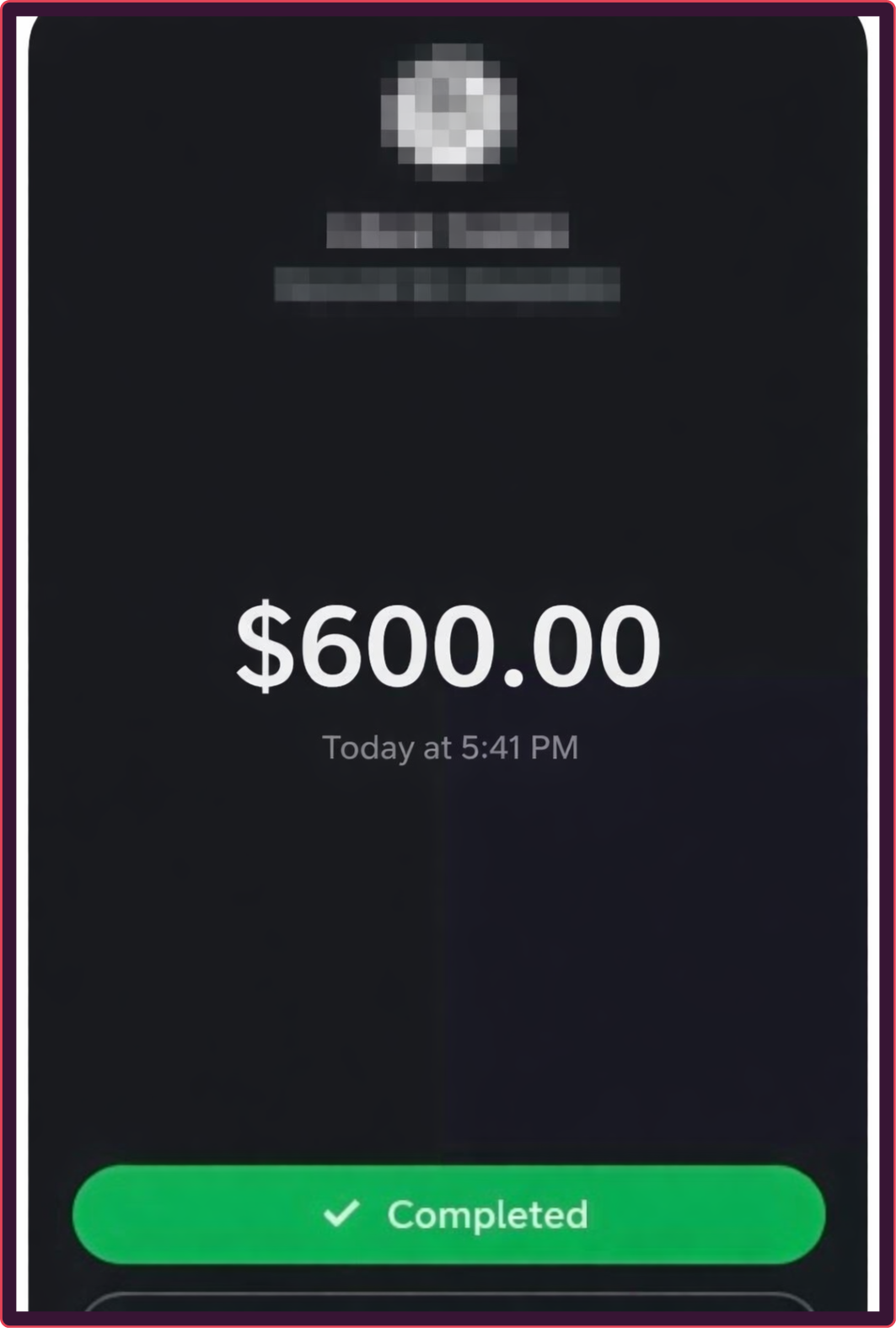
An example of a Cash App transaction for illustrative purposes only.
For anyone reviewing Cash App payment evidence, it is critical to understand that what you are seeing is a representation of a transaction state at a specific moment. Without live access to the platform, independent corroboration, or deeper structural analysis, these artifacts should not be treated as standalone proof of payment.
How to stop Cash App fraud
The most reliable way to detect Cash App fraud at scale is through AI powered document verification.
The manipulated digital proof that Cash App scams rely on, is nearly impossible to verify independently through third parties. As editing software and generative AI models improve, these artifacts become even harder to detect and easier to create.
Meanwhile, platform layouts change, UX gets updated, and screenshots are partially obscured. Using verified evidence to compare documents or master templates to spot inconsistencies is imperfect and unscalable.
AI document verification works by analyzing how a document or image was constructed, not just what it looks like. Instead of trusting the visible transaction details, advanced systems evaluate structural, behavioral, and cross document signals that indicate whether the artifact was manipulated or synthetically generated.
Some of the key fraud detection signals include:
- Internal structure.
- Cross document intelligence.
- Warning signs in metadata.
- Image consistency.
- Backgrounds and fonts.
Instead of relying on database lookups, template matching, or reading sensitive transaction content, it focuses on structural integrity and behavioral plausibility. That makes it effective even when fraudsters use stolen but technically valid account details.
As Cash App payments, receipts, and screenshots become easier to fake at scale, AI becomes the only practical way to detect them consistently across high volumes of submissions.
How institutions can stop Cash App scams
Some organizations process Cash App transactions directly (including financial institutions connected to Cash App accounts, payment processors handling Cash Card transactions, and Cash App itself).
For those organizations, AI powered transaction monitoring can help prevent fraud by uncovering the repeatable patterns that Cash App scams follow.
Payment fraudsters reuse accounts, recycle artifacts, operate in bursts, and coordinate activity across multiple victims. Monitoring these behaviors in real time helps identify suspicious clusters before losses escalate.
Transaction monitoring can help detect:
- Repeated disputes tied to the same $cashtag.
- Rapid payment and refund cycles across linked accounts.
- High velocity transfers inconsistent with typical peer to peer behavior.
- Coordinated activity across shared devices or submission channels.
- Escalating patterns of overpayment and reversal attempts.
While AI document verification focuses on the artifacts themselves, transaction monitoring answers: does this behavior look suspicious? They're both a vital part of AI fraud detection.
Threat intel: Template data about fake Cash App screenshots
Our Threat Intelligence Unit collects data about template farms which make and distribute fake document templates for fraudulent purposes.
During our research we haven't yet cataloged many Cash App documents, however, they are still very prevalent online. A simple search on Pinterest.com (a well known template hub) for "cash app screenshot," reveals thousands of results.
They're even conveniently catalogued into "failed, completed," and sorted by amounts like "$50, $100, and $300" to help fraudsters get the exact data they need.

Threat level: Legitimate Cash App screenshots should never have any indication (whether in metadata or website watermarks) of being downloaded from an online source. This is a clear sign of a threat.
Payment applications like Cash App are also heavily exposed to account farming (the resale of pre-onboarded accounts).
While we haven't found many examples of Cash App screenshots in the usual places, it could be because people are buying entire accounts and making the screenshots themselves (or buying two accounts, sending money to themselves, then using those screenshots).
How to spot Cash App payment scams
AI powered verification is the way to go if you want a trustworthy process for spotting fake Cash App payments, receipts, and screenshots at scale.
That said, in many real world scenarios (rental disputes, reimbursement reviews, marketplace sales, freelance payments, small claims cases) you may still need to assess the evidence manually.
When that happens, you cannot rely on instinct or familiarity.
Fraud tools are designed to replicate the Cash App interface convincingly. Understanding how Cash App artifacts are created, how they are manipulated, and what structural signals matter is essential.
The following red flags are a good place to start.
Fake Cash App receipts
Cash App generates transaction confirmations in two primary formats: email confirmations and exported transaction histories. For email, these records typically include the sender’s display name, $cashtag, amount, timestamp, and transaction status. They are system-generated and reflect data for a specific transaction.
Users can also export transaction history statements from their Cash App account as PDF or CSV files covering a selected date range. These statements summarize payment activity across the account for a set period, including payments sent, payments received, and associated transaction details.
However, Cash App confirmations are not designed to function as certified third-party payment documents. An email confirmation or exported account statement records platform activity, but it does not independently prove that funds settled into the recipient’s balance or remained there after the transaction.
The key distinction between a Cash App receipt and a traditional merchant receipt is that the Cash App version reflects recorded platform activity, not guaranteed settlement visible to external parties.
Cash app receipts can be turned into fraud in the form of:
- Confirmations edited to change the amount or recipient.
- Templates used to generate “Cash App” emails that look legitimate at first glance.
- Status labels such as “completed,” altered before the image is shared.
- Display names are changed to impersonate a trusted user.
- Old receipts and transaction records reused with minor edits.
Many reviewers assume that “Email from Cash App equals proof.” It does not. Email headers can be spoofed, sender names can be imitated, and visual layout can be replicated using widely available templates.
In most real world scenarios, these receipts and records are not shared as raw email files with header data intact. They are shared as screenshots. That changes the verification equation entirely.
Fake Cash App screenshots
Screenshots are the most common evidence used in Cash App scams.
Screenshots aren’t live transaction data. Once captured, it can be cropped, edited, annotated, or manipulated.
Fraudsters exploit screenshots by:
- Cropping out the balance section to hide inconsistencies.
- Replacing recipient names while keeping the rest of the layout identical.
- Using them to remove valuable metadata.
- Reusing the same base image across multiple scams with slight variations.
People often say, “It looks exactly like my app.” That is precisely the point. Modern fraud tools replicate UI layouts convincingly. Visual familiarity is not evidence of authenticity.
Some scammers go further and send screen recordings instead of still images. But screen recordings can be staged using controlled accounts or simulated interfaces. A moving image is still a representation, not proof of settlement.
Screenshots are limited as evidence because they remove important context. You cannot see full account history, linked funding source behavior, or whether the transaction was later reversed.
Another misconception is that a visible transaction ID or reference number proves authenticity. Most screenshots contain no verifiable live token that can be independently validated without access to the platform. A string of numbers on an image is not confirmation.
Transforming live transaction data into a screenshot causes the loss of structural and contextual signals. What remains is a static visual artifact that can be manipulated with basic tools.
For this reason, screenshots are the evidence that makes fake Cash App payments possible.
Fake Cash App payments
A fake Cash App payment is not always a completely fabricated transaction. Often, it is a misrepresented one.
Cash App transactions can appear in different states inside the app:
- Pending. A payment initiated but not fully processed.
- Completed. Funds successfully transferred and reflected in the recipient’s balance.
- Failed or canceled. A transaction that did not settle.
One of the most persistent misconceptions is, “If it says completed, it’s real.” Status labels in screenshots are easily altered. The only authoritative confirmation of a Cash App payment is the live transaction visible inside the official app, reflected in the recipient’s actual balance.
Other fake Cash App payment tactics include:
- Transaction narrative mismatches. The payment description, memo field, or conversation context surrounding the transfer contradicts the situation being described.
- Artificial transaction histories. Staging a sequence of transfers between accounts they control in order to build a believable activity feed.
- Display names and $cashtags. Changing display names to impersonate a trusted sender while keeping the underlying account unrelated.
In many cases, the screenshot or “receipt” is simply supporting evidence for the broader Cash App scam. The visual proof is presented first. Urgency is applied second. Independent verification is discouraged or delayed.
7 signs of Cash App fraud
Once you understand how Cash App payments, receipts, and screenshots function, the warning signs become more structural than visual.
Fraud management begins with the common indicators of Cash App fraud:
- Asking for an account upgrade. Cash App does not require recipients to “upgrade” or “unlock” accounts to release completed peer to peer payments. Claims of frozen funds pending a fee are high risk.
- Instant deposit logic mismatches. Cash App charges a fee for instant deposits to linked debit cards. If a scammer claims they used instant transfer but the screenshot shows no fee deduction or inconsistent timing, the transaction logic does not align with platform mechanics.
- $cashtag inconsistencies. If the provided $cashtag cannot be located inside the live app, differs slightly from the display name, or appears newly created with high value transfers. The $cashtag is a unique identifier.
- Balance visibility gaps. Fraudulent screenshots often exclude the running balance or full activity history. Legitimate transfers are reflected in the account’s balance and transaction feed. Cropped images that isolate a single transfer remove important context.
- Platform language anomalies. Slight deviations in wording, outdated phrasing, or inconsistent formatting across screens. Cash App uses specific terminology for transaction states and features.
- Cross artifact reuse patterns. The same screenshot structure appears in multiple disputes, with only names or amounts changed, suggesting template reuse.
- Standalone evidence submitted for third party verification. Cash App screenshots, receipts, and email confirmations are often submitted as the only “proof” of payment to people who do not have access to the live transaction view. Landlords, property managers, marketplace dispute and trust teams, finance and reimbursement reviewers, HR and contractor payment reviewers, and fraud and investigations teams should treat this evidence as high risk because:
- The verifier cannot see settlement. A static screenshot cannot prove the payment actually posted to the recipient’s balance, which is the only outcome that matters in most disputes.
- The verifier cannot validate context. Cropping removes the activity feed, balance movement, and surrounding history that would expose inconsistencies (like missing debits, mismatched dates, or contradictory transaction states).
- The verifier is being forced into image based trust. Once the artifact is detached from the app, it becomes easy to edit, reuse, or fabricate using generators, especially when the victim is under time pressure to release goods, services, keys, or refunds.
Unless it’s coming directly from Cash App or supported by additional documentation, don’t trust it.
The only authoritative confirmation of a Cash App payment is the live transaction reflected inside the official app on the recipient’s side. Screenshots, emails, and exported files should (at best) be used for supporting evidence (not guarantees) of payment activity.
When Cash App transactions are used for document verification
Cash App is designed to facilitate fast transfers between users inside the app, not to generate certified payment documents for external compliance or dispute workflows.
However, Cash App screenshots and exports are still used in situations where someone needs to prove that money was sent or received.
Here’s how Cash App transaction artifacts appear in document verification workflows:
- Rental and deposit verification. Screenshots of Cash App transfers are submitted as proof of rent payments, security deposits, or holding fees in housing disputes.
- Marketplace transactions. Buyers present payment confirmations to sellers before goods are shipped, especially in informal or peer to peer sales environments.
- Expense reimbursements. Employees, contractors, and gig workers submit Cash App screenshots to justify business expenses, reimbursements, or ad hoc payments.
- Freelance and contractor disputes. Payment evidence is used to claim that work has been paid for or that balances remain outstanding.
- Small merchant revenue claims. In some onboarding or trust and safety workflows, Cash App activity screenshots are presented to demonstrate sales history or business activity.
- Refund and chargeback disputes. Screenshots are used to pressure recipients into returning funds that were allegedly sent in error.
- Tax reporting. Cash App may issue Form 1099-K for qualifying business transactions. In tax preparation or audits, users sometimes submit Cash App payment histories or screenshots to support reported income.
The people who need to review these artifacts should be aware of several challenges:
- It lacks live settlement visibility.
- It can be easily edited or generated.
- It removes transaction context and surrounding account behavior.
- It does not prove account ownership or control.
- It may reflect a transaction state that later changed.
That’s why, when financial decisions depend on whether money truly moved, the only reliable confirmation is the live transaction visible inside the official Cash App interface and reflected in the recipient’s actual balance.
Common Cash App scam tactics
Cash App scams are rarely random. They follow repeatable structures: visual proof is introduced, urgency is applied second, independent verification is discouraged or delayed.
Common Cash App fraud tactics include:
- Fake evidence. Edited receipts or UX visuals sent to perpetuate the fraudulent transfer of funds.
- Refund bait using fake transfers. A request to “return” part of the money before the recipient checks their actual activity feed.
- Rental deposit scams using payment screenshots. Requests a deposit using a fake property listing and forged transaction evidence.
- Expense claim manipulation. Edited Cash App confirmations to change reimbursement amount or responsible party to get more money back or send money to the wrong individual.
- Recycled payment artifacts. The same Cash App payment screenshot or activity snippet is reused repeatedly with small edits to the sender name, $cashtag, or amount to support multiple fraudulent claims.
Conclusion
Fake Cash App payments, receipts, and screenshots are high risk because they’re easy to create and hard to verify.Once these artifacts leave the live Cash App environment, and are used for document verification, they become even less reliable.
Resistant Documents uses structural analysis to detect manipulation patterns, reused layouts, and signs of generative AI tampering that are invisible to manual reviewers.
If your organization relies on payment screenshots or digital transaction evidence in verification workflows…
Scroll down to book a demo.
Frequently asked questions (FAQ)
Hungry for more Cash App scam content? Here are some of the most frequently asked questions about Cash App scams from around the web.
How do scammers fake Cash App payments?
Scammers typically fake Cash App payments by manipulating screenshots of transaction confirmations or activity feeds.
In more advanced cases, fraudsters use generative AI tools or staged accounts to simulate realistic transaction flows before capturing and sharing the image as proof of payment.
Can Cash App screenshots be trusted as proof of payment?
No. Cash App screenshots should not be treated as reliable proof of payment on their own.
Screenshots are static images. They can be edited, cropped, reused, or fabricated entirely. They do not independently confirm that funds settled into the recipient’s balance. The only work as supporting evidence.
What should I do if someone sends me a Cash App payment screenshot?
Do not release goods, services, refunds, or deposits based solely on a screenshot.
Open your own Cash App account and verify that the funds appear in your balance and transaction history. If the payment is not reflected in your account, it was not completed.
Avoid communicating outside official support channels, and report suspicious activity directly through the app.
How to spot fake Cash App transaction documents with AI?
Resistant AI offers document fraud detection software that can spot signs of fraud in Cash App scams invisible to the human eye.
What’s the difference between a Cash App payment, receipt, and screenshot?
Cash App payments, receipts, and screenshots all relate to transaction activity on the platform, but they differ in purpose, creation, and what they evidence:
Cash App payment: The transfer of funds
- Issued by: Cash App (as part of its internal payment processing system).
- Characteristics:
- Represents the actual movement of money between sender and recipient.
- Exists as live transaction data inside the app.
- Moves through defined states such as pending, completed, failed, or canceled.
- Authoritative event. Everything else is a representation of it.
Cash App receipt. System-generated confirmation.
- Issued by: Cash App (via in app confirmation or email notification).
- Characteristics:
- Summarizes transaction details such as amount, date, and account identifiers.
- Reflects transaction data at the moment it was generated.
- Designed as a record of activity, not a certified third party verification document.
- Can be forwarded, screenshotted, or exported.
Cash App screenshot. User-captured image.
- Issued by: The account holder (not Cash App).
- Characteristics:
- Is a static image captured from a device screen.
- May show a payment screen, activity feed, or balance view.
- Can be edited, cropped, or fabricated.
- Does not independently prove settlement, account ownership, or authenticity.
Is there software to detect fake Cash App payments, receipts, and screenshots?
Yes. Resistant AI detects fake Cash App transaction documents by analyzing how screenshots and digital artifacts were constructed and whether they show signs of manipulation or synthetic generation.
Who needs to check for fake Cash App transaction documents?
Fake Cash App receipts, screenshots, and payment confirmations are most likely to be reviewed by individuals responsible for verifying payments or resolving financial disputes, including:
- Landlords and property managers verifying rent or deposits.
- Marketplace trust and safety teams evaluating buyer seller disputes.
- Finance and reimbursement departments reviewing expense claims.
- HR and contractor payment reviewers confirming freelance compensation.
- Fraud analysts and investigators assessing peer to peer scam reports.
- Dispute resolution and compliance teams making financial decisions based on payment evidence.
Is making or using fake Cash App payments, receipts, and screenshots illegal?
Yes. Creating or using fake Cash App transaction documents can constitute fraud, misrepresentation, or attempted theft depending on the jurisdiction and use case.
How is Cash App different from Venmo?
Cash App and Venmo are both peer-to-peer payment platforms, but they are built around slightly different ecosystems and product features.
Cash App, developed by Block, functions more like a lightweight financial services platform. In addition to sending and receiving payments through a $Cashtag or phone number, users can receive direct deposits, use a Cash App debit card, buy stocks or Bitcoin, and operate business accounts that may generate tax reporting such as Form 1099-K.
Venmo, owned by PayPal, emphasizes social payments and shared transactions between friends. Its activity feed is a defining feature, where users can publicly or privately display payments and messages tied to transactions.
Venmo also supports business profiles and goods-and-services payments, but it is most commonly associated with social payments like splitting bills, rent, or group expenses.
How are Cash App scams different from Venmo scams?
Cash App scams tend to revolve around payment requests, fake screenshots, and account manipulation using the platform’s $Cashtag system. Fraudsters frequently send payment requests disguised as “verification fees,” “refund confirmations,” or prize claims.
Venmo scams, by contrast, often exploit the platform’s social payment features and buyer-seller interactions. Fraudsters commonly rely on fake purchase listings, goods-and-services disputes, or “accidental payment” refund schemes where victims are asked to return money before the original transaction is reversed.

Fraud awareness, examples, and lessons
Learn more about fraud in specific industries, best practices, and targeted documents.
View all
Application fraud in 2026 is easier to attempt: accessible tools and services help applicants turn false claims ...
Within the fake document ecosystem, things can change fast. Four months ago, we reported that OnlyFake, the ...

In May 2026, a Dallas resident was convicted of running coin-operated “amusement machines” without a business ...

NEW YORK & PRAGUE – 1 October 2026 – Ocrolus, the AI workflow and analytics platform for lenders, today ...
For a few hundred dollars, sellers on Telegram promise to boost your credit score using someone else's credit ...

Key takeaways Fake certificates can use real numbers Fraudsters can copy a genuine business’s VAT number onto a ...