
Venmo is a peer-to-peer payment app that lets users send and receive money instantly for everyday transactions from splitting rent or dinner to paying small businesses.
Unfortunately, Venmo scams are becoming all too common in 2026. Just look to Montana where (in January) a fraudster tried to scam a small furniture business out of more than $1000. This phenomenon has been on the rise since early 2025.
The fraud typically surfaces in three forms: fake Venmo payments, receipts, and screenshots.
Scammers may claim a payment was sent when it was only “pending,” distribute fabricated email confirmations, or share edited screenshots that mimic real transaction screens. In many cases, the goal is to convince someone that money has been sent (or will soon be available) in order to trigger the release of goods, services, or real funds.
They also circulate beyond the app. Venmo payment screenshots and confirmation emails are frequently submitted as proof of income, proof of payment, or transaction evidence in semi-formal and informal verification workflows.
As AI tools and fraud ecosystems improve, visual inspection alone is no longer enough to spot document fraud.
You need to understand the crime: what Venmo scams are, how scammers manipulate payment states, confirmation screens, and transaction evidence to make fake activity look real, and what the tell-tale signs of that manipulation are.
Let’s get started.
What is a Venmo scam?
A Venmo scam, Venmo fraud, or Venmo payment scam is any deceptive scheme that uses the Venmo platform, its payment system, or its transaction evidence to trick someone into sending money, releasing goods or services, or accepting fabricated proof of payment.
In practice, Venmo fraud tends to occur in two primary ways.
- On-platform payment manipulation (APP fraud). This includes scams where individuals exploit Venmo’s payment mechanics directly. The fraud happens through real or misrepresented transactions inside the app. Examples include:
- Claiming a payment is “pending” to pressure a victim into shipping goods.
- Sending money and then requesting a reversal.
- Using overpayment or refund narratives.
- Social engineering victims into voluntarily sending funds.
- Claiming a payment is “pending” to pressure a victim into shipping goods.
- Transaction evidence misuse (document-style fraud). When transaction records are removed from the app and reused as evidence elsewhere. Screenshots, confirmation emails, exported histories, and balance views submitted as proof. Examples include:
- Rental applications.
- Reimbursement claims.
- Gig work verification.
- Marketplace sales.
- Financial and legal disputes.
Regardless of where the scam unfolds, it almost always centers on three categories: payments, receipts, and screenshots.
Venmo does not issue standardized financial documents like banks do. Instead, it generates platform-native transaction records that users can view, screenshot, export, or share outside the app.
These representations are commonly treated as proof that a transaction occurred, even though they lack built-in authenticity guarantees once removed from the platform.
The most commonly reused Venmo transaction artifacts include:
- In-app transaction confirmation screens. Screens shown after a payment is sent or received, displaying the amount, sender and recipient identifiers, transaction status, date, and a payment note.
- Transaction activity views. Timeline-style screens listing past payments, often cropped to highlight a single transaction while removing surrounding context.
- Email payment notifications. Automated emails confirming that a payment was sent or received, which can be forwarded, edited, or visually altered.
- Account balance screenshots. Images showing available Venmo balance, sometimes used to imply solvency or ability to pay.
- Exported transaction histories. CSV or PDF files generated from account activity, which can be modified after export.
Because these artifacts are user-captured or exported from the platform (rather than shared through a secure verification channel) their appearance and completeness can vary significantly.
Screenshots may reflect different stages of a transaction, omit surrounding activity, or exclude account identifiers depending on how they are captured. Even officially exported transaction histories become static files once downloaded, and can be edited or reformatted outside the platform.
For anyone reviewing Venmo transaction evidence (whether in a rental application, reimbursement claim, dispute, or marketplace sale) variability alone should trigger caution.
Screenshots and exported files should not be treated as definitive proof without additional verification. Whenever possible, confirm payments through the live Venmo app, require full transaction views rather than cropped images, and avoid relying solely on forwarded emails or static documents as evidence of completed payment.
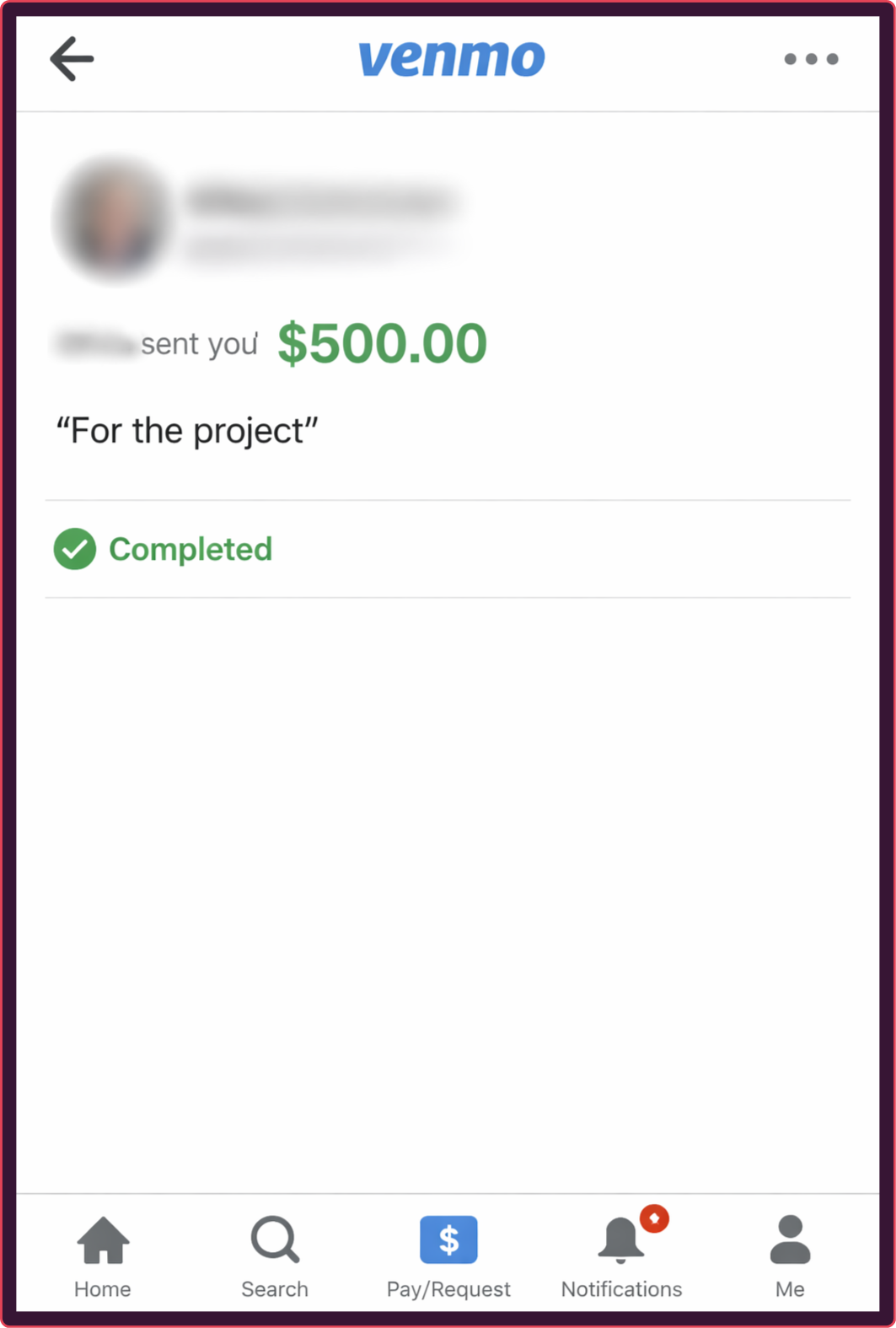
An example of a Venmo transaction for illustrative purposes only.
However, when you only have the evidence or the transactions themselves (due to time or resource constraints), there are still some methods you can employ:
How to stop Venmo fraud
The most reliable way to detect Venmo fraud at scale is through AI-powered document verification.
Venmo scams frequently rely on manipulated digital proof (edited screenshots, payment confirmations, and receipts). Modern editing tools and AI-generated interfaces make fakes easier to produce at scale, making manual verification even less effective.
AI document verification works by analyzing the structural integrity of transaction artifacts rather than relying on visual familiarity. Instead of asking, “Does this look real?”, automated systems evaluate:
- Layout consistency and UI structure.
- Font rendering and pixel-level anomalies.
- Metadata inconsistencies.
- Compression artifacts and edit traces.
- Structural deviations from known Venmo interface patterns.
This approach operates at scale, applies consistent validation standards, and looks at evidence with context, comparing inputs against entire document sets instead of analysis on a case by case basis.
As Venmo screenshots and payment confirmations become easier to fabricate, automated verification becomes the only scalable way to distinguish authentic transaction records from fraudulent representations.
How institutions can stop Venmo scams
For organizations that process Venmo transactions directly (including marketplaces that integrate Venmo as a payment method, financial institutions ingesting structured Venmo data, and Venmo/PayPal itself) stopping fraud requires AI-powered transaction monitoring.
Many Venmo scams originate within transaction flows: refund manipulation, mule account networks, abnormal payment velocity, coordinated transfers, and social engineering-driven activity that appears legitimate in isolation.
AI-powered transaction monitoring can detect fraud risks by analyzing behavioral patterns across accounts and payment activity in real time. Instead of evaluating a single transaction as proof of payment, monitoring systems assess the broader context: identifying anomalies, suspicious account relationships, and high-risk movement of funds.
Document verification protects against manipulated transaction evidence. Transaction monitoring protects against abusive transaction behavior. Platforms operating at scale need both.
Threat intel: Template data about fake Venmo screenshots
Our Threat Intelligence Unit collects data about template farms which make and distribute fake document templates for fraudulent purposes.
During our research we haven't yet cataloged many Venmo documents, however, they are still very prevalent online. A simple search on Pinterest.com (a well known template hub) reveals over thousands of results.
They're even conveniently catalogued into "pending, failed, proof, successful, declined," to help fraudsters get the exact screen shot they need.
 Search results for "Venmo payment" on Pinterest.
Threat level: Legitimate Venmo screenshots should never have any indication (whether in metadata or website watermarks) that they were downloaded from an online source. Any screenshot that appears to be sourced from an online template should be treated as an immediate threat.
Payment applications like Venmo are also heavily exposed to account farming (the resale of pre-onboarded accounts).
While we haven't found many examples of Venmo screenshots in the usual places, it could be because people are buying entire accounts and making the screenshots themselves (or buying two accounts, sending money to themselves, then using those screenshots).
Another scam involves using prepaid cards from a bank, sending funds, and then withdrawing from a Venmo account. It seems a bit convoluted, but still shocking to see a public place like Scribd hosting Venmo scams.
How to spot Venmo payment scams
As we stated above, AI-powered verification is the most reliable way to detect manipulated Venmo transaction evidence at scale. But in many real-world situations (rental reviews, marketplace disputes, reimbursement claims, or one-off payment checks) you may still need to assess this evidence manually.
When that happens, you can’t rely on whether something “looks real.” You need to understand how Venmo transaction artifacts are created, how they’re commonly manipulated, and the universal warning signals that tend to appear across fake payments, fabricated receipts, and edited screenshots.
The following red flags apply universally and, when spotted, should be taken as important risk indicators:
Fake Venmo receipts
Venmo does generate official transaction confirmations in certain contexts (particularly for Business Profile purchases, Tap to Pay transactions, charitable donations, and downloadable account statements). These receipts are system-generated records tied to specific transactions and may include payment breakdowns, merchant details, timestamps, and confirmation data.
For standard peer-to-peer payments, Venmo typically provides in-app confirmations and email notifications rather than formal merchant-style receipts. While these confirmations originate from the platform, they are not designed as standalone verification documents for third parties.
The key distinction is this: a Venmo receipt is a system-generated output. It originates from Venmo’s infrastructure and reflects live transaction data at the moment it is created.
Fraud enters the picture when that system-generated record is:
- Altered after download.
- Forwarded from a spoofed email.
- Reformatted or partially exported.
- Recreated to mimic legitimate receipt formatting.
In most real-world scenarios, these receipts are not shared as raw system files, they are shared as screenshots.
Fake Venmo screenshots
Screenshots are the most common vehicle for Venmo fraud.
A screenshot captures a moment in the app, but it strips away the live data layer that makes the transaction trustworthy. It removes dynamic elements, backend validation, and real-time account context, turning transaction data into a simple image file.
Fraudsters exploit this in several ways:
- Cropping out payment status indicators.
- Capturing transactions while still “pending.”
- Removing surrounding activity history.
- Altering display names or profile images.
- Editing amounts or timestamps.
- Recreating full transaction screens using design templates or AI image tools.
A screenshot is a static image of a screen at a specific moment in time, not a structured transaction record. It can capture incomplete payment states, omit surrounding context, or even depict a spoofed confirmation screen.
Once shared as an image file, it does not prove that the sender controls the account shown, that the payment settled successfully, that the transaction wasn’t later canceled or disputed, or even that the screen originated from the official Venmo app rather than a fakeinterface.
They are easy to manipulate and difficult to validate without direct access to the live transaction inside the app (or a document verification tool).
For this reason, screenshots are often the foundation of fake Venmo payment claims.
Fake Venmo payments
A fake Venmo payment is not always a fabricated transaction. Often, it is a misrepresented one.
Venmo transactions can appear in different states in the app and notifications, including “pending” when funds are not yet final, “completed” once fully processed, and status messages indicating a payment was declined or canceled (depending on how and when the transaction was captured).
Fraud frequently occurs when one of these states is presented inaccurately or fabricated entirely, creating urgency or false assurance.
Common tactics include:
- Claiming a payment has been sent when it is still pending. Fraudsters may share confirmation screens before a transaction has fully completed, creating urgency before funds are actually available.
- Requesting refunds before settlement is verified. Scammers may pressure recipients to refund a payment immediately (before verifying that the transaction has completed and cleared). If the original payment later fails, is canceled, or is tied to a disputed funding source, the victim may be left without either payment.
- Using overpayment narratives to trigger return transfers. A fraudster sends more than expected, claims it was accidental, and pressures the recipient to return the excess before the original payment clears.
- Presenting edited confirmation screens as proof of completed funds. Screenshots may be altered to remove status indicators or falsely suggest that funds have settled.
In many cases, the screenshot, or “receipt,” is simply supporting evidence for the broader claim of the fake Venmo payment scam.
The fraud, however, is rooted in transaction logic, exploiting timing, status confusion, and trust in visual confirmation to trigger real-world action.
Understanding how Venmo payment states work is essential to identifying when a claimed payment does not match transaction reality.
7 signs of Venmo fraud
Once you understand how Venmo payments, receipts, and screenshots function, the warning signs become more consistent across formats.
Venmo scams often reveal themselves through structural inconsistencies rather than obvious visual flaws. Common indicators that help with fraud prevention include:
- Missing or inconsistent transaction context. Screenshots or confirmations that obscure or omit key transaction details: such as payment status (pending vs. completed), full date and time, sender and recipient @usernames, navigation headers, surrounding activity history, or other standard interface elements.
- Venmo-impossible UI or wording. Any “Venmo confirmation” that includes instructions Venmo doesn’t use (like claiming a payment will only be released after you ship an item and upload shipping info, pushing you to resolve an “urgent account issue”), directing you to click a non-Venmo link, or telling you to call a phone number for support.
- Spoofed or non-Venmo email origins. Payment confirmations sent from domains that are not official @venmo.com addresses, that include mismatched reply-to fields, embedded phone numbers claiming to be Venmo support, or instructions to click external links to “release” or “verify” funds are strong indicators of a phishing or spoofed receipt rather than a legitimate Venmo transaction notification.
- Urgency tied to unverified payment status. Any request to immediately ship goods, provide services, upgrade an account, or issue a refund before a payment shows as fully completed inside the official Venmo app (especially when accompanied by claims that funds are “pending,” “on hold,” or require additional action to be released).
- Requests to move the conversation or verification off-platform. Any instructions to continue the transaction outside the Venmo app such as: communicating only by email, resolving the issue through a third-party website, confirming payment through a link rather than the official app, or handling “verification” outside Venmo’s interface.
- Transaction logic that contradicts how Venmo works. Claims that funds require an additional payment to be “unlocked,” that a personal account must be upgraded to a business account to receive money, that a buyer must send extra funds for processing before a payment clears, or that a transaction can only be completed after external verification are inconsistent with Venmo’s standard payment flow and are commonly used in fake payment scams.
- Standalone artifacts submitted for third-party verification. Landlords, underwriters, marketplace operators, and fraud teams reviewing Venmo transaction evidence, screenshots, emailed confirmations, or exported files should be weary because:
-
- You (the reviewer) usually have no independent way to confirm the artifact with Venmo (you’re not logged into the account; you can’t validate it against a trusted source).
- Screenshots are especially vulnerable because they can be screenshots of a spoofed email (Venmo explicitly warns about this).
- Even official exports are editable once downloaded, and unless you ingest them directly from the source account via a controlled method, you’re still trusting.
- You (the reviewer) usually have no independent way to confirm the artifact with Venmo (you’re not logged into the account; you can’t validate it against a trusted source).
In other words if it’s not officially coming from Venmo or accompanied by lengthy supporting evidence, don’t trust it.
The only authoritative confirmation of a Venmo payment is the live transaction visible inside the official app. Screenshots, emails, and exported files should be treated as representations (not guarantees) of payment activity.
When Venmo transactions are used for document verification
Venmo was built for peer-to-peer and small business transactions, not formal third-party verification. Yet its transaction confirmations are sometimes submitted in rental applications, income checks, marketplace disputes, and risk reviews, where external parties must assess their authenticity.
Here’s how Venmo transaction documents are commonly used in document verification workflows:
- Rental and deposit verification. Screenshots of Venmo payments are submitted as proof of rent, deposits, or partial payments in housing disputes.
- Expense reimbursements. Employees and contractors use Venmo confirmations to justify business expenses, travel costs, or ad hoc payments.
- Employment and freelance disputes. Payment confirmations are used to claim completed work or unpaid balances.
- KYB and small-merchant revenue verification. While formal documentation of this practice is limited, Venmo business profile transactions and goods-and-services payments can generate official tax reporting (such as 1099-K forms when thresholds are met), meaning that Venmo activity may be submitted in certain small-merchant onboarding or marketplace verification workflows to demonstrate sales history
- Refund and chargeback scenarios. Fake or altered confirmations are used to pressure victims into sending money back.
- Peer-to-peer scams. Fraudsters rely on Venmo’s familiarity to convince victims that funds have already been transferred.
For institutions seeking to accept Venmo transaction as evidence, these documents present several challenges:
- They are user-generated exports, not issuer-certified documents.
- They are usually submitted as screenshots or images, not system-verified files.
- Reviewers often lack direct access to the platform to confirm authenticity.
- Visual familiarity creates a false sense of legitimacy, reducing scrutiny.
That’s why we recommend only relying on them as supporting evidence and not single sources of truth.
Common Venmo scam tactics
We’ve already covered how Venmo payments, receipts, and screenshots can be manipulated. But understanding the broader scam patterns they support makes those warning signs easier to recognize in practice.
Common Venmo fraud tactics include:
- Fake payment confirmations. Edited screenshots used to claim funds were sent.
- Pending presented as completed. Unfinalized payments shown as settled.
- Overpayment refund schemes. Claims of accidental overpayment used to trigger return transfers.
- Rental or deposit fraud. Screenshots used as proof of payments for properties that don’t exist.
- Expense or reimbursement abuse. Altered confirmations submitted to justify fake expenses.
- Reused artifacts. The same screenshot recycled with minor edits across multiple submissions.
The mechanics vary, but the structure is consistent: visual proof is created first, pressure is applied second, and verification is delayed or avoided entirely.
Conclusion
Fake Venmo transaction documents are high-risk proof that fraudsters actively exploit to bypass reimbursements, rental checks, employment verification, and peer-to-peer dispute processes.
As this evidence circulates outside the platform, it loses any inherent trust signals and becomes easy to manipulate at scale.
Resistant documents focuses on structural analysis. By examining how Venmo transaction documents are built, reused, and submitted across workflows, we surface fraud signals that are undetectable to the human eye and impossible to catch with simple automation.
Scroll down to book a demo.
Frequently asked questions (FAQ)
Hungry for more Venmo scam content? Here are some of the most frequently asked questions about Venmo scams from around the web.
How do scammers fake Venmo payments?
Scammers typically fake Venmo payments by manipulating screenshots of transaction confirmations or payment activity screens. These images are edited to show completed payments, altered amounts, or different recipient names, then sent as proof of payment in scams involving rentals, reimbursements, refunds, or peer-to-peer transactions.
Can Venmo payment screenshots be trusted as proof of payment?
No. Venmo payment screenshots should not be treated as reliable proof of payment on their own. Screenshots can be easily edited, reused, or taken out of context. They’re supporting evidence at best.
How to spot fake Venmo transaction documents with AI?
AI-powered fraud detection tools can spot fake Venmo transaction documents by analyzing structural and visual patterns rather than reading transaction content. This includes detecting edited layouts, reused screenshots, metadata anomalies, and signs of generative AI manipulation that are invisible to human reviewers and assist not just in detection fraud, but also fraud management.
What’s the difference between a Venmo receipt, payment, and screenshot?
Venmo receipts, payments, and screenshots all relate to transaction activity on the platform, but differ in what they represent, how they are generated, and what they actually prove.
Venmo payment: The underlying transfer of funds between accounts.
- Issued by: Venmo (as part of its payment processing system).
- Characteristics:
- Represents the actual movement of money between sender and recipient.
- Moves through defined processing states (such as pending or completed).
- Exists as live transaction data inside the Venmo app or web interface.
- May later be subject to cancellation, failure, refund, or dispute depending on context.
- Is the authoritative event. Everything else is a representation of it.
Venmo receipt: A system-generated confirmation of a transaction.
- Issued by: Venmo (via in-app confirmation, email notification, business receipt, statement, or tax form such as a 1099-K where applicable).
- Characteristics:
- Summarizes transaction details such as amount, date, and account identifiers.
- May include merchant details for business profile or goods-and-services payments.
- Can be accessed inside the app or delivered via email.
- Designed as a record of activity, not as a standalone third-party verification document.
- Reflects transaction data at the time it was generated.
Venmo screenshot: A user-captured image of a Venmo screen.
- Issued by: The account holder (not Venmo).
- Characteristics:
- Is a static image file rather than structured transaction data.
- Can capture a payment screen, receipt, activity feed, or balance view.
- May omit surrounding context depending on how it is cropped.
- Can depict pending, completed, or even spoofed states.
- Does not independently prove account control, settlement, or transaction authenticity.
Is there software to detect fake Venmo transaction documents?
Yes. Resistant AI detects fake Venmo transaction documents, analyzing how documents are built, submitted, and reused across cases, enabling detection of manipulated screenshots and AI-generated fakes without relying on Venmo data or reading sensitive information.
Who needs to check for fake Venmo transaction documents?
Fake Venmo receipts, payments, and screenshots are most likely to be reviewed by individuals responsible for verifying payments, resolving disputes, or assessing financial claims.
- Landlords and property managers. To confirm that rent, deposits, or holding fees were actually paid.
- Marketplace trust and safety reviewers. To evaluate buyer-seller disputes involving claimed payments.
- Finance and reimbursement staff. To verify that submitted expenses or repayments correspond to real transactions.
- HR personnel and contract managers. To confirm freelance or gig compensation claims.
- Fraud analysts and investigators. To assess suspected peer-to-peer payment scams.
- Small-business onboarding or KYB reviewers. To validate claimed sales activity or revenue history during merchant verification.
- Dispute resolution and compliance officers. To determine whether payment evidence supports a financial or contractual claim.
Is making or using fake Venmo transaction documents illegal?
Yes. Creating or using fake Venmo transaction documents can constitute fraud, misrepresentation, or attempted theft depending on the jurisdiction and use case. Penalties may include fines, civil liability, or criminal charges, especially when fake confirmations are used to obtain money, goods, or services.
What is the $600 Venmo rule?
The “$600 Venmo rule” refers to IRS reporting requirements for goods and services payments. If a user receives $600 or more in qualifying business transactions in a calendar year, Venmo may issue a Form 1099-K and report that income to the IRS. It does not apply to personal peer-to-peer payments such as splitting rent or reimbursing friends.
Can someone get into your bank account from Venmo?
Not directly. Venmo does not give other users access to your bank account information. However, if someone gains access to your Venmo account through phishing, password reuse, or social engineering, they may be able to send money or attempt withdrawals using your linked bank account or card.
What is the newest Venmo scam?
Recent Venmo scams often involve account takeover attempts, where fraudsters send phishing emails or texts claiming there is a problem with your account, a suspicious login, or a pending payment. These messages typically include fake links designed to steal login credentials, allowing attackers to access and misuse the account.

Fraud awareness, examples, and lessons
Learn more about fraud in specific industries, best practices, and targeted documents.
View all
Application fraud in 2026 is easier to attempt: accessible tools and services help applicants turn false claims ...
Within the fake document ecosystem, things can change fast. Four months ago, we reported that OnlyFake, the ...

In May 2026, a Dallas resident was convicted of running coin-operated “amusement machines” without a business ...

NEW YORK & PRAGUE – 1 October 2026 – Ocrolus, the AI workflow and analytics platform for lenders, today ...
For a few hundred dollars, sellers on Telegram promise to boost your credit score using someone else's credit ...

Key takeaways Fake certificates can use real numbers Fraudsters can copy a genuine business’s VAT number onto a ...