
In March of 2026, CBS New reported 800+ business registrations filed in California may have been fraudulent.
When state registries can’t be relied on, institutions have to turn to the documents themselves to weed out the criminals. But fake California business licenses are still prevalent. Banks, lenders, marketplaces, and other industries that check California business documents need to be careful about the integrity of the documents they accept.
Because editable documents, document generators, template farms, and AI-generated documents, make faking a California business license incredibly easy, and the documents look convincing enough to pass most manual review teams.
Read on to learn what California business licenses are, how they are being forged, how to spot a fake, and how AI-powered tools can help.
Check out our “how to spot fake business licenses” blog for a universal guide on how to spot fake documents of this type.
What is a California business license?
A California business license is usually not one document from one statewide office. It is a practical term for the documents that show a business is registered, permitted, or authorized to operate within a specific jurisdiction of California.
For some businesses, the closest state-level equivalent is the California Seller’s Permit. This applies to businesses that sell or lease tangible personal property subject to sales tax. It is issued by the California Department of Tax and Fee Administration (CDTFA), and it allows the business to collect, report, and pay sales tax.
A California Seller’s Permit will typically include:
- Business name. The legal name or registered business name connected to the permit.
- Permit number. The identifying number used by CDTFA to reference the permit or account.
- Business address. The location where the permitted business activity takes place.
- Owner or entity details. Information linking the permit to the person or legal entity responsible for the business.
- Issue date. The date the permit was issued or became effective.
- Business activity. Details about the taxable sales activity covered by the permit.
- Issuing authority. CDTFA branding, office information, or official references showing where the permit came from.
But a seller’s permit is only one piece of the California authorization picture, especially for service-only, professional, healthcare, real estate, consulting, SaaS, education, and other businesses that may not sell or lease taxable tangible goods. Depending on the business, reviewers may also need to check:
- Secretary of State records. These show whether a corporation, limited liability company, or limited partnership is registered with the state.
- Certificate of Status. This confirms whether a registered entity is in good standing with the California Secretary of State.
- Local business license or business tax certificate. These are issued by cities or counties and often confirm permission to operate in a specific location.
- Fictitious business name statement. This may be required when a business operates under a name different from its legal name.
- Professional or occupational license. These apply to regulated industries such as construction, healthcare, security, real estate, cosmetology, pharmacy, and other licensed activities.
- Premises or activity-specific permits. These can include zoning, health, fire, alcohol, cannabis, environmental, or industry-specific approvals.
Businesses have to think about California like New York where the document package serves the same purpose as a single statewide license. It’s not like Washington, where there is a single statewide document, or Florida, where the document goes by a different name but serves a similar purpose.
The exact documents you need depend on what the business does, where it operates, and whether the activity is regulated. The best starting point is CalGold, California’s permit assistance tool.
You’ll also likely need to check with the city or county office where the business is located, plus the relevant state regulator for professional, tax, premises, or industry-specific approvals.
.webp?width=1143&height=1463&name=fake%20california%20sellers%20permit%20example%20(1).webp)
Example of a fake California Seller's Permit (not a business license) for illustrative purposes only.
Why are California business licenses important?
California business licenses prove that a business is allowed to operate in California jurisdiction where they’re located, under the right name, and for the right activity.
With several documents in the business authorization package, understanding each, its context, and the specific procedures which it proves can mean the difference between onboarding a valid applicant and accidentally accepting fraud.
Landlords, marketplaces, insurers, and lenders need to be aware of these principles if they do business with California-based companies.
Here’s how California business licenses are used for document verification:
- KYB and merchant onboarding. Teams use business licenses, seller’s permits, Secretary of State records, and local registrations to check whether a merchant is real, active, and authorized for the claimed business activity.
- Lending and underwriting. Lenders use California business documents to confirm that an applicant’s operating history, revenue claims, location, and business activity line up with official records.
- Procurement and vendor onboarding. Buyers use these records to confirm that a vendor is properly registered, locally authorized, and licensed for regulated services.
- Marketplace trust and safety. Platforms use business licenses and permits to screen sellers, contractors, healthcare providers, cannabis-related businesses, alcohol sellers, and other higher-risk applicants.
- Insurance underwriting. Insurers use California licensing records to check whether a business has the right authorization for its stated activity, premises, and risk profile.
These documents are trusted because they come from official state, local, and industry-specific authorities, including the California Department of Tax and Fee Administration, California Secretary of State, Department of Consumer Affairs, city finance offices, county licensing offices, and professional boards.
But they only work when they are reviewed as a package. Reviewers still need to confirm that the specific document proves the specific authorization being claimed, or request the entire package to comprehensively prove “right to do business in California.”
California business license law
The main split for California business licensing is between state registration, state tax permits, local business licensing, and industry-specific approvals.
For many businesses, the most important state-level document is the California Seller’s Permit. It is issued by the California Department of Tax and Fee Administration (CDTFA) and is required when a business sells or leases tangible personal property subject to sales tax.
This makes it the closest statewide equivalent to a business license for many retail, e-commerce, wholesale, and goods-based businesses.
But the seller’s permit does not cover every business. It also does not replace local authorization which have their own documents that go by different names.
The baseline document may be called a Business Tax Registration Certificate in Los Angeles, a Business Registration Certificate in San Francisco, a Business Tax Certificate in San Diego or San José, a Business Operations Tax Certificate in Sacramento, a Business Tax License or Business Tax Certificate in Oakland, or simply a Business License in cities like Long Beach, Anaheim, Bakersfield, and Riverside.
That naming difference matters for fraud review. Knowing the document names for specific cities can help easily spot fake documents (i.e., using a Business Tax Registration Certificate in San Francisco is suspicious).
For unincorporated county areas, the county, not the nearest city, is usually the starting point, but not always. San Diego County, for example, says unincorporated areas do not need a county business license, but may still need other permits. Riverside County separately flags business registration for mobile businesses in unincorporated areas.
Businesses with fewer licensing steps are usually remote, service-based, non-public-facing, and not selling taxable goods. A software consultant working from home in San Jose may have a lighter path than a restaurant in Los Angeles, cannabis retailer in San Francisco, contractor in San Diego, childcare provider in Sacramento, or food truck in Oakland.
But even a low-risk business typically still needs entity formation, a fictitious business name statement, local business registration, employer registration, zoning clearance, or a seller’s permit if it sells taxable goods.
For California, the best starting point is CalGold, the state’s permit assistance tool. It helps identify federal, state, local, and regional permits by business type and location.
Importantly, CalGold itself does not issue permits, does not verify license numbers, and does not replace checking with the actual agency.
Other offices and registries to be aware of are: CDTFA, Secretary of State, DCA board, Contractors State License Board, and local health departments.
California business licensing process
The best way to start your specific business is by using CalGold, but here is a generic flow many businesses follow to establish themselves in California:
- Register the entity with the state. Corporations, LLCs, and limited partnerships file with the California Secretary of State. Sole proprietors and general partnerships skip this step.
- File a fictitious business name statement. If the business operates under a name that differs from the owner's legal name or the registered entity name, file a FBN statement with the county clerk where the business is located.
- Apply for a seller's permit. Businesses selling or leasing tangible personal property subject to sales tax register with CDTFA. Both wholesalers and retailers need one.
- Confirm zoning before committing to a location. Cities like San Francisco and Sacramento tell applicants to clear zoning before or during registration. Signing a lease first can be an expensive mistake.
- Register with the city or county. Apply for the local baseline document at the address where the business operates. In an unincorporated area, start with the county instead of the nearest city.
- Apply for premises approvals. Food, retail, salon, manufacturing, and other physical operations may need health, fire, building, occupancy, or signage permits before opening.
- Apply for industry licenses. Contractors go through CSLB. Regulated professions go through the relevant DCA board. Cannabis, alcohol, tobacco, and childcare businesses have their own state and local approvals.
- Register as an employer. Businesses with employees register with EDD for payroll tax.
Threat intel: Template data about California business documents
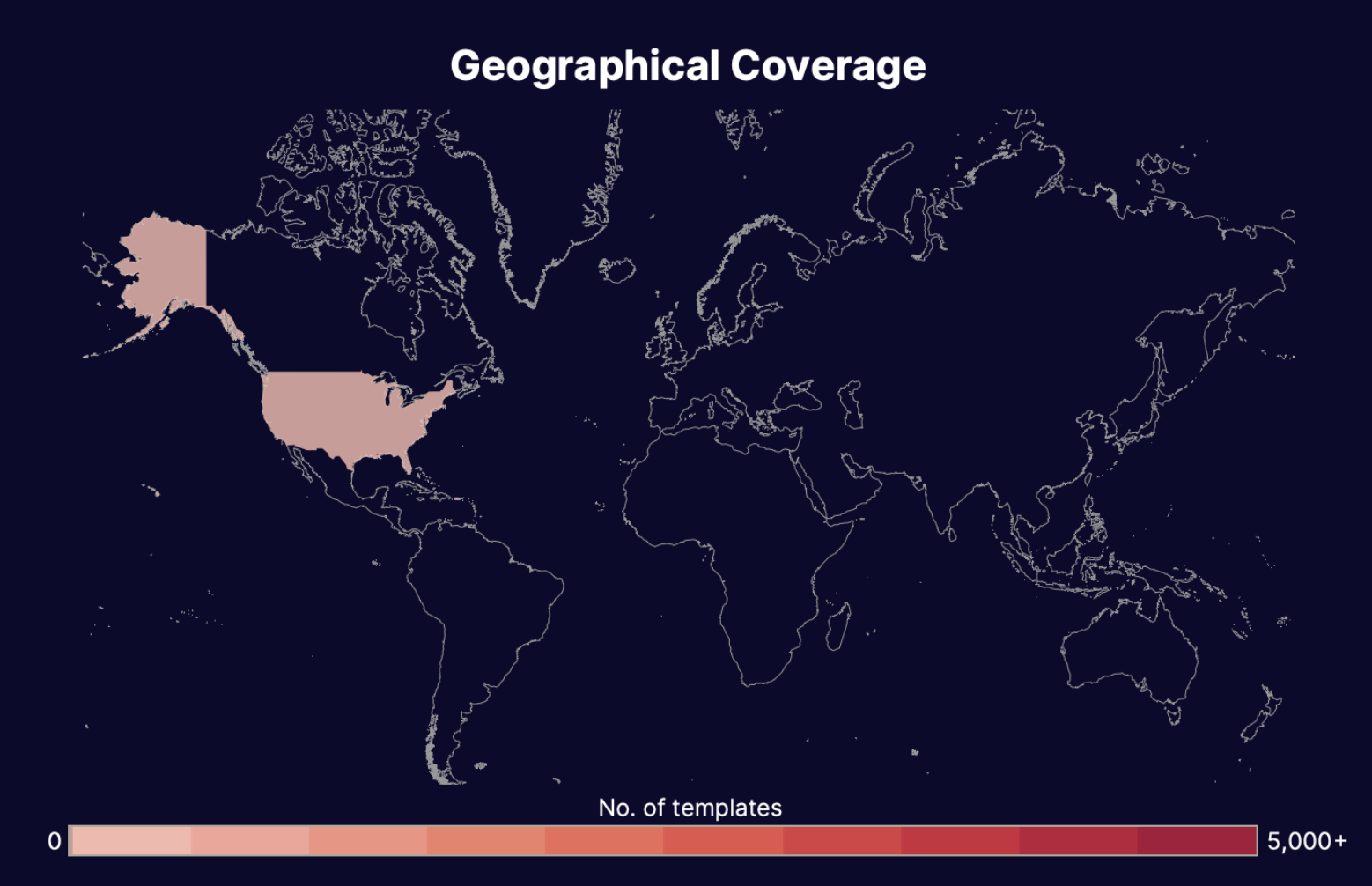
Threat intel stats: California business documents
5 signs of a forged or fake California business license
If you miss a fake California business license you can end up approving an unauthorized business which could put you in breach of legislation surrounding AML and CFT or also put your other customers at risk of scams and other criminal activity.
Manual review is especially difficult because genuine California business documents can come from several state, local, and industry-specific authorities, each with their own naming, layouts, and signs of fraud.
That said, here are some universal signs for further inspection when it comes to California business documents:
1. Inconsistent formatting
California business documents should match the issuing authority. A California Seller’s Permit should look like a CDTFA document, a local business tax certificate should match the city or county formatting etc. Unauthentic layouts or a combination of elements from different jurisdictions/departments can indicate fraud.
- State vs. city and county level. Generic California seals where a specific, lower level agency should appear.
- Multiple agency names. CDTFA, Secretary of State, city, county, or DCA names used on the same document or interchangeably.
- Entity numbers after 2025. California corporations registered before late 2025 carry a seven digit number preceded by C. LLCs and limited partnerships from that era carry a twelve digit number with no letter. Entities registered after the Secretary of State's December 2025 change carry a twelve character ID starting with B. Existing entities keep their original numbers, so the check is whether the number style fits when the business registered, not when the document was printed. A company claiming to have formed in 2026 while showing a C number has the wrong number for its own registration date.
2. Incorrect or misleading information
A fake California business license often fails because the document’s wording does not match what California actually issues. But the harder problem is a real document being submitted with the wrong meaning.
- A BOE seller’s permit issued after 2017. In 2017 the responsibility for administering seller’s permits shifted from the California Board of Equalization to the CDTFA.
- An expiration date on a seller's permit. CDTFA seller's permits do not expire. They stay valid while the holder is actively engaged in business as a seller and end only through cancellation or revocation.
- A city business license from a city that does not issue one. San Diego issues a business tax certificate and states it does so instead of a business license. Sacramento issues a business operations tax certificate and says it does not issue a business license.
3. Bad math and uncharacteristic figures
Dates, fees, and timelines can expose fake or misused California business documents. A forged document may look clean at first glance, but the numbers often tell a different story.
- Activity before registration. Business activity that predates the entity registration, seller’s permit, or local license.
- Date contradictions. Issue dates, effective dates, renewal dates, and expiration dates that contradict each other.
- A fictitious business name statement with a term that is not exactly five years. Under California Business and Professions Code section 17920, an FBN statement expires five years from the filing date, in every county.
- A San Francisco registration certificate that does not run July 1 to June 30. San Francisco issues Business Registration Certificates on the city's fiscal year.
- A Los Angeles BTRC with a renewal date outside the city's calendar cycle. Los Angeles business taxes are due January 1 and become delinquent after the last day of February.
- A temporary seller's permit with a term longer than 90 days. CDTFA issues temporary permits for sellers operating under 90 days, such as event and seasonal vendors.
4. California business license inconsistencies
Because California business authorization is usually a document package, reviewers should compare every submitted record against the others. Fraud often appears in the gaps between documents.
- One Los Angeles BTRC covering several addresses. The Los Angeles Municipal Code requires a separate BTRC for each fixed location in the city.
- Incorrect jurisdiction. City or county document issued for a jurisdiction where the business is not registered.
- An FBN statement whose registrant type conflicts with the business name. California FBN statements record the registrant as an individual, general partnership, corporation, or LLC.
5. Metadata discrepancies
A fake California business license may look official on screen, but the file can still show signs of manipulation. This is especially important when applicants submit PDFs, screenshots, or scans instead of documents downloaded directly from an official portal.
- Image editing software. File created in Photoshop, Canva, Illustrator, a PDF editor, or a template platform.
- Screenshots. Screenshot-only submission for a document that should be verifiable through an official authority. Cropped edges hiding certificate numbers, QR codes, footers, or issuing-office details make them even less reliable.
- Author. Personal author metadata on a supposed government-issued document.
- Creation date. File creation date that comes after the stated issue date.
Disclaimer: Manual review is difficult to scale across California’s state, local, and industry-specific document systems as each examiner must know the specific in’s and out’s of every office, their documents, formatting, and context.
How to verify California business licenses
In California, what a reviewer is checking depends on which document reaches them. Underwriters and KYB analysts usually receive a Secretary of State filing or a CDTFA seller's permit.
Procurement and marketplace teams more often get a city document because that is what shows the business is cleared to operate at the address it claims. Credentialing and compliance teams work from Department of Consumer Affairs and CSLB records, where the license belongs to a named individual rather than the company, so the check is whether that person is actually attached to the business.
The first step is to identify whether the California Business license is real or fake. You can do this in one of two ways: manually or automated.
Manual verification still matters but, as we stated above, California business authorization is fragmented across state, local, and industry-specific systems. That fragmentation is exactly why manual review becomes difficult at scale. Knowing every office and their documents is a mountain of information for one team to keep track of.
Every year, layouts update, logos change, entire processes are adopted by new offices (like in our Seller’s Permit example), confidently knowing and recognizing flaws in all that paper work is no easy task, especially when you have to verify the content and information with each individual office.
Automation, especially AI document verification, is better suited for scale because it can forensically analyze a document and its metadata without relying on registry lookups or what the document says.
Still, manual verification remains a common tactic when verifying a California business license.
Manual verification of California business licenses
Most of what you need is in the red flags above. If you want to confirm a document against the issuing authority, California has three lookups worth the time, and each one covers a different layer of the licensing picture.
- Check the state business registry. Start with the California Secretary of State bizfile business search to confirm the legal name, entity type, registration status, and filing history. For a complete guide of all US business registries, visit our USA KYB guide.
- CDTFA permit verification. Confirms whether a seller's permit number is valid and belongs to the business named on the document, at the CDTFA verification tool.
- Department of Consumer Affairs license search. Confirms whether a named individual holds a current professional or contractor license, at DCA License Search and CSLB Check A License.
Keep in mind: Reviewers may need to check state registration, tax permits, local licensing, professional boards, and file-level fraud signals for the same applicant to adequately verify what a statewide business license is meant to. That slows down onboarding and creates room for exactly the kind of confusion fraudsters exploit.
Using AI and machine learning to spot fake California business licenses
California business licenses are hard to verify because there is no single template, issuer, or registry that covers every business. That makes them a poor fit for rules-based checks alone.
And AI isn’t only a memorization engine for every California city, county, and regulator. It inspects whether a document has been manipulated, whether the structure makes sense, and whether the document is consistent with the rest of the applicant’s file without needing a million templates to train it.
Here’s how AI can help detect fake California business licenses:
- Document-agnostic detection. AI can analyze seller’s permits, local business tax certificates, Certificates of Status, professional licenses, and other business authorization documents without needing one rigid template for each issuer.
- Structural analysis. AI can inspect layout, spacing, fonts, embedded objects, seals, signatures, QR codes, and certificate numbers to identify signs of tampering or template-based forgery.
- Cross-document context. AI can compare the business name, DBA, owner details, address, license category, issue date, and activity across the applicant’s full document package.
- GenAI detection. AI can identify visual and structural signals associated with synthetic documents, recreated certificates, or AI-assisted image manipulation.
Automation vs. AI
Automation can extract fields, check databases, route cases, and apply rules. That is useful for clean, predictable workflows. But rules-based automation struggles when a California business document is local, unfamiliar, or altered using unknown fraud tactics.
AI adds another layer. It can analyze visual structure, metadata, manipulation traces, and cross-document consistency across many document types, catching signs of fraud you may have been previously unaware of.
Conclusion
Fake California business licenses are difficult to catch because California business authorization is split across state registration, seller’s permits, local business tax certificates, professional licenses, and activity-specific approvals.
That fragmentation gives fraudsters room to submit forged documents, misuse real records, or pass off partial authorization as full permission to operate. Reviewers need to confirm both document authenticity and document relevance.
Resistant Documents helps teams detect fake, altered, and AI-generated business documents by analyzing structure, metadata, manipulation signals, and cross-document inconsistencies across varied state and local formats.
If your team reviews California business licenses, seller’s permits, or local authorization documents at scale, Resistant AI can help you spot the gaps before fraudsters exploit them.
Scroll down to book a demo.

Fraud awareness, examples, and lessons
Learn more about fraud in specific industries, best practices, and targeted documents.
View all
Application fraud in 2026 is easier to attempt: accessible tools and services help applicants turn false claims ...

Within the fake document ecosystem, things can change fast. Four months ago, we reported that OnlyFake, the ...
In May 2026, a Dallas resident was convicted of running coin-operated “amusement machines” without a business ...

NEW YORK & PRAGUE – 1 October 2026 – Ocrolus, the AI workflow and analytics platform for lenders, today ...

For a few hundred dollars, sellers on Telegram promise to boost your credit score using someone else's credit ...
Key takeaways Fake certificates can use real numbers Fraudsters can copy a genuine business’s VAT number onto a ...